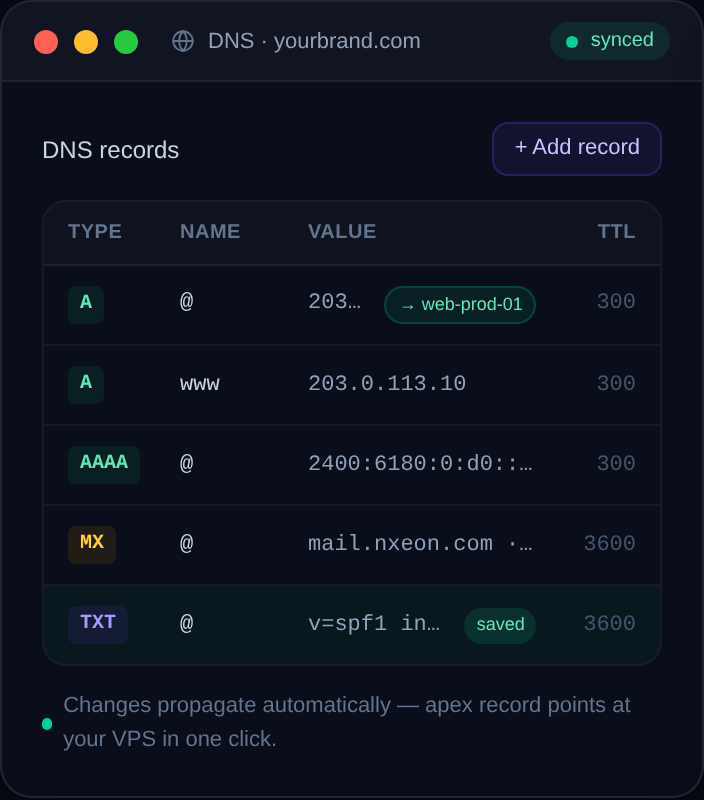
Every domain runs on a handful of record types. Here's what each one does, with real examples, so you can read and edit DNS with confidence.
Open your domain's DNS panel and you'll see a table of records with cryptic types. You don't need all of them, and you don't need to be a network engineer. Five record types cover almost everything most sites and servers require. Here's each one, in plain terms, with examples.
A record — name to IPv4
The A record is the workhorse. It maps a name to an IPv4 address, which is how you point a domain at a server.
Type: A
Name: @
Value: 203.0.113.10
TTL: 3600
Here @ means the root domain (example.com itself). To point your site at a VPS, this is the record you set — value equals your server's public IP.
AAAA record — name to IPv6
An AAAA record does the same job as an A record, but for IPv6 addresses (the newer, much larger address space).
Type: AAAA
Name: @
Value: 2001:db8::1
TTL: 3600
If your server has an IPv6 address, add an AAAA record alongside your A record so IPv6-capable visitors reach you directly.
CNAME record — name to another name
A CNAME points one name at *another name* rather than an IP. It's an alias. The classic use is sending www to your root domain:
Type: CNAME
Name: www
Value: example.com
TTL: 3600
Important rule: you can't put a CNAME on the root domain (@) alongside other records. CNAMEs are for subdomains like www, blog or app.
MX record — where email goes
MX (Mail eXchange) records tell the world which servers handle email for your domain. They include a priority number — lower numbers are tried first.
Type: MX
Name: @
Value: 10 mail.example.com
TTL: 3600
If you use a hosted email provider, they'll give you the exact MX values to paste in. Without correct MX records, mail to your domain bounces.
TXT record — arbitrary text
A TXT record holds plain text, and it's used for verification and email security. You'll meet it constantly:
Type: TXT
Name: @
Value: "v=spf1 include:_spf.example.com ~all"
TTL: 3600
Common uses include SPF (which servers may send mail as you), DKIM (a signing key for your mail), DMARC (a policy for handling spoofed mail), and domain-ownership verification for services like search consoles.
A couple of others you'll occasionally see
- NS records — declare the authoritative nameservers for the domain or a subdomain.
- SRV records — specify the host and port for particular services (some game servers and voice apps use these).
- CAA records — restrict which certificate authorities may issue SSL certificates for your domain.
Reading a zone at a glance
Once you know the types, a DNS zone reads like a simple table: A and AAAA send visitors to your server, CNAME creates aliases, MX routes mail, and TXT proves ownership and secures email. That's 95% of what you'll ever touch.
In your Nxeon dashboard, these records sit right beside the server they point to — add an A record for the root, a CNAME for www, and your TXT records for email, all in one place, then let propagation do the rest.
Register a domain
Deploy in seconds, not weekends
Nxeon · Nxeon editorial
★★★★★ Straight-talking guides from the team that runs the servers.